Android and iOS, Two Device Layers: agent-device Against My Own Stack
The same kind of task on an Android emulator and an iOS Simulator, run through two device layers. One handed the agent screens of a few hundred bytes; the other handed it tens of kilobytes. Both finished, and both platforms had a moment that would have fooled an agent.
Your coding agent can already build the app. Next you want it to open the app on an Android emulator or an iOS Simulator, walk a flow, and tell you honestly whether it worked. A mobile MCP server or CLI is the layer in the middle: it turns "tap Done" into something the device understands, and turns the screen back into something the model can read.
This is for anyone wiring that layer into Claude Code, Cursor or their own agents.
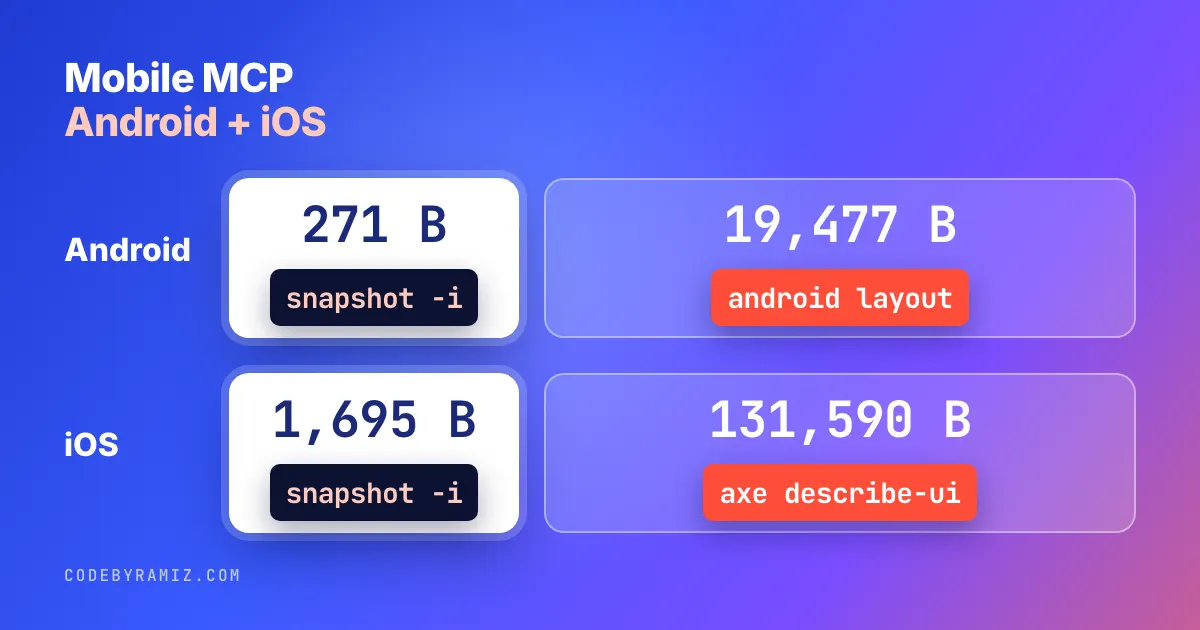
The reading half is where I've been paying. On my stack, one Android dialog was 19,477 bytes and one iOS form was 131,590, mostly keyboard. Callstack's agent-device showed them in 271 and 1,695 bytes.
So I ran both layers through the same tasks on both platforms and logged every call. This isn't sponsored. Nobody at Callstack saw it before it went up.
The tasks, and the two layers
On Android (Android 17 emulator, Pixel 9a profile): open Settings, scroll to About emulated device, tap Device name, replace the text, press OK, accept the confirmation, check the new name, screenshot.
On iOS (iPhone 18 Pro Simulator, iOS 27.2) I planned the same rename, but the Simulator's Name row is read-only. The closest task with a text field and a save: Contacts, Add, type a first name, Done, check the saved card, screenshot.
agent-device 0.21.36 is an MIT-licensed CLI, MCP server and Node API, an "open source device layer for AI coding agents" in its own words. The loop is open, snapshot -i, then press or fill on a ref like @e5, with --settle so each action waits for the UI to go quiet and prints what changed.
My stack is plain tools. On Android: adb for taps and text, and android layout from Google's android CLI 1.1.16717390 (install script at dl.google.com/android/cli) for the screen as JSON. Every Android call went through my private farm wrapper, which takes a device lease first so two agents can't drive one device. That makes my Android timings my setup, not something you can reproduce from this post. On iOS: AXe 1.8.0 (brew install cameroncooke/axe/axe), the tool from the real-iPhone article, with axe describe-ui, tap -x -y, type and screenshot, called directly with no lease. Both baseline versions were read from my machine on 2026-11-04.
| Android: agent-device | Android: my stack | iOS: agent-device | iOS: my stack | |
|---|---|---|---|---|
| Result | done | done | done | done |
| Tool calls (failed) | 33 (5) | 18 (2) | 12 (1) | 7 (0) |
| Summed time | 27.2 s, 10.2 s of it one timed-out wait | 41.7 s | 21.4 s | 7.3 s |
| Typical read | 0.12–0.6 s | 2–5 s | 0.2–0.5 s | 0.7–2.0 s |
| Typical action | 0.7–2.4 s, returns a diff | 1.1–1.5 s, returns nothing | 1.1–4.9 s, returns a diff | 0.2–1.5 s, returns nothing |
Counts include my own mistakes. Android counts run from opening Settings to the last screenshot on both sides. iOS counts run from opening Contacts to the check on the saved card on both sides, so they leave out each side's screenshot and one untimed agent-device raw snapshot. agent-device's first iOS open printed "Building Apple runner..." and its first snapshot took 35.7 s, on an earlier Settings screen.
These are summed times for the sessions I recorded, not a controlled race. On Android agent-device came out faster; my wrapper's lease and instrumentation round trip on every call may contribute, but I didn't measure them separately. On iOS AXe came out faster; agent-device's --settle waits may contribute.
What a mobile MCP server hands the agent
The tree is what the agent pays for, in tokens and attention, every time it looks. Here is the Android device name dialog as snapshot -i showed it:
Page: com.android.settings
App: com.android.settings
Snapshot: 5 nodes
@e1 [scroll-area] [scrollable]
@e2 [text-field] "sdk_gphone16k_arm64" [focused] [editable]
@e3 [scroll-area] "com.android.settings:id/buttonPanel" [scrollable]
@e4 [button] "Cancel"
@e5 [button] "OK"
| Screen | agent-device snapshot -i | My stack |
|---|---|---|
| Android: Settings home | 801 B (~200 tokens) | 5,825 B android layout |
| Android: About, after the change | 866 B | 5,712 B |
| Android: name dialog, keyboard up | 271 B (~70 tokens) | 19,477 B (~4,900 tokens) |
| iOS: Contacts list | 1,605 B | 55,213 B axe describe-ui |
| iOS: New Contact, keyboard up | 1,695 B | 131,590 B (~33,000 tokens) |
| iOS: saved contact card | 969 B | 45,225 B |
About 7 to 72 times smaller on Android, 34 to 78 times on iOS. AXe sizes are compact JSON; as emitted, pretty-printed, they're about six times larger. Tokens are bytes ÷ 4, a rough guide.
Not everything is filtered. On iOS, -i still listed every keyboard key (67 nodes on the form), which Android's -i didn't.
The second gain is feedback. After every tap my agent re-reads the whole tree to learn what happened. agent-device's --settle answers in the same call. This is the iOS fill:
Filled 7 chars
settled after 929ms: +4 -3 (~26 unchanged)
- @e55 [button] "Done" [disabled] [covered]
+ @e55~s477531 [button] "Done" [covered]
+ @e62~s477531 [text-field] "benchad"
One call typed the name and showed Done becoming enabled. Lines trimmed.
The ~s477531 suffixes pin a ref to that output. On Android, pressing a bare @e5 after a diff was refused with the hint "Retry with the exact emitted ref @e5~s683610". A stale coordinate on my stack just taps whatever is there now.
iOS Simulator MCP: when the refs said no
Look at that diff again: Done is marked [covered]. Pressing it failed:
Error (COMMAND_FAILED): Ref @e55 is covered by another visible element and cannot be tapped safely
Hint: Covered by the toolbar "Toolbar" at (0, 83 402x48).
The raw XCTest tree for the same button said "hittable": true. On Settings > General it was worse: a toolbar spanning the whole screen (402×874) marked every row [covered], and both press @e8 and find text About were refused. A coordinate press at the same spot worked both times.
The safety check is a good idea, but on iOS 27 it misread the toolbars, and my agent was back to pixel coordinates, which refs are meant to replace.
Two smaller iOS differences. agent-device's fill set "benchad" exactly. axe type sends real keystrokes, so iOS capitalised mine to "Benchours", and my lowercase assertion failed until I made it case-insensitive. And every Contacts snapshot printed "Simulator AX snapshot unavailable (circuit-disabled); used XCTest".
Where wait text passed too early, on both platforms
After fill, I wanted to check the name had taken. agent-device wait text bench-ad on Android, wait text benchad on iOS: both returned at once, exit code 0, no output. Neither had been saved. The only match was the text field I'd just typed into. An agent would read that as done.
On Android, pressing OK opened a second dialog warning that the name is visible to apps and nearby devices. Its -i snapshot was three nodes: a button panel, Cancel, OK. Nothing says what OK agrees to. The full snapshot showed the title and a truncated warning; my layout JSON had both in full.
And I made the same mistake on both platforms. After a full snapshot I pressed a ref number from an earlier -i output.
The two views number the screen differently: on Android @e3 was the status-bar clock, on iOS @e7 opened the Apple Account sign-in sheet. agent-device followed its rule (refs come from the latest output); I didn't. An agent switching views can do the same.
What I changed: assert where the value can only exist after the save. The final checks are the Android About screen and the iOS contact card, not the field. Also, the help lists find among ways to verify, but help find says "the action defaults to click". My find text bench-ad tapped the field.
My stack had its moment too: android layout failed twice on About with Could not obtain idle state until I added --no-idle.
Two agents, one device
On both platforms a second session on the same device got DEVICE_IN_USE with a hint to wait or close. On Android, --wait 20000 polled for about 4 seconds while I closed the first session, then failed for a different reason: the app I'd asked for isn't on that image.
Those claims only cover agent-device. While it held the Simulator, axe describe-ui ran fine; my iOS stack has no lease at all. While my farm held the Android emulator for another agent, agent-device snapshot ran too, and only my wrapped tools were refused. Each lock stops only its own tools. If your agents share devices, as in my multi-agent setup, agent-device needs to sit under your lock.
And agent-device devices listed my personal iPhone next to the emulator; I didn't test opening it.
Try it
These are my recorded runs minus the mistakes. The refs are from my screens; on yours, take them from the latest output.
npm i -g [email protected]

# Android: rename the device
agent-device open com.android.settings --serial emulator-5556 --session bench --platform android --foreground
agent-device snapshot -i --session bench
agent-device scroll bottom --settle --session bench
agent-device press @e7~s683597 --settle --session bench   # About emulated device
agent-device snapshot -i --session bench
agent-device press @e5 --settle --session bench           # Device name
agent-device snapshot -i --session bench
agent-device fill @e2 bench-ad --settle --session bench
agent-device snapshot -i --session bench
agent-device press @e5 --settle --session bench           # OK
agent-device snapshot -i --session bench
agent-device press @e3 --settle --session bench           # OK on the warning
agent-device wait text bench-ad --session bench           # on About, after the save
agent-device close --session bench

# iOS: add a contact (my session was already open with --platform ios --udid <SIM_UDID>)
agent-device open com.apple.MobileAddressBook --session ios
agent-device snapshot -i --session ios
agent-device press @e49 --session ios --settle            # Add
agent-device snapshot -i --session ios
agent-device press @e5 --session ios --settle             # Continue (typing tip)
agent-device snapshot -i --session ios
agent-device fill @e62 benchad --session ios --settle     # First name
agent-device press 364 100 --session ios --settle         # Done by coordinates; @e55 was refused as covered
agent-device snapshot -i --session ios
agent-device wait text benchad --session ios              # on the saved card
agent-device close --session ios

claude mcp add agent-device -- agent-device mcp   # same commands as an MCP server
What I didn't test
Cloud and proxy providers (accounts needed), my real phones (another machine), XcodeBuildMCP's snapshot_ui, and Mobile Next's mobile-mcp, the top result for "mobile mcp". One emulator, one Simulator, one run each.
Which one wins what
| Better here | Why | |
|---|---|---|
| What the agent reads | agent-device | 271 B vs 19,477 B (Android), 1,695 B vs 131,590 B (iOS), plus a diff per settled action |
| Speed | split | agent-device on Android, AXe on iOS |
| Completing the blocked iOS taps | neither | both finished them by coordinates; agent-device first refused taps that worked as "covered" |
| Typing exact text | agent-device | fill sets the value; axe type got autocapitalised |
| A modal's text in the compact view | my stack | Android -i dropped the dialog title and warning |
| Not passing early | neither | wait text matched the field on both; my stack has no wait |
| Several agents sharing an Android device | my stack | my farm lease blocks my wrapped tools; agent-device locks only its own sessions. On iOS my stack had no lease |
If you're starting from nothing, agent-device is a better first layer than raw layout dumps on either platform: smaller screens, refs, diffs. On iOS, expect to fall back to coordinates until the covered check settles down. If your agents already share devices, keep your lock as the gate and run agent-device inside it. That's what I'm testing next.
Keep reading
- Claude Code in Android Studio: The Editor Is the Easy PartThe plugin gives the agent diffs, your selection and lint. The phone is reached from the terminal, and that is where my agents' habits, my screenshots and my own guard hook surprised me.
- When Your Coding Agent Hits a Rate Limit: A Fallback Ladder That Keeps WorkingA rate limit, a stalled run that already finished the work, and a pull request that still fails review need three different responses. Here is the ladder I use to tell them apart.
- The Agent Taps the Phone. Nothing Touches the Mac.Writing code stopped being the expensive half; verifying it started. On iOS the last mile is a real device — and unlike Android, the platform does not simply let you in. Here is what it takes, and what it catches.